Steven Koch
01 / THE PRODUCTION TEST

NOIR CALL — a Complete Test Case

A 16-line audio drama scene: Viktor, a tired NY detective, calls Laura from the streets of Manhattan. Two voices, a telephone filter on her side, rain and city atmosphere, slow jazz vinyl bleeding through her apartment, and a final outro of his footsteps walking off.

The scene served as a controlled end-to-end test: generate assets, select takes, process dialogue, and arrange every element inside AudioGen. It tested a complete workflow against a concrete result rather than only demonstrating a UI.

NOIR CALL — Final Mix
Viktor & Laura · ~75s · Voice + SFX + Music + FX + Composer
7
Connected stages
1
Local workflow
16 GB
Test GPU
16
Dialogue lines tested
02 / THE RESEARCH QUESTION

Can One Local Workflow Remove the Gaps?

The prototype connected seven previously separate production stages. The question was whether fewer tool changes could enable faster iteration without handing creative decisions about takes, timing, and mix to the AI.

Voice Designer Script SFX Studio Music Studio FX Studio Composer Export
03 / STEP 01 · VOICE DESIGNER

Voice Designer

The first experiment: derive a reusable synthetic speaker identity from a written description.

Qwen3-TTS turns a prose description ("A weathered American male voice in his early forties, deep baritone with a slight gravel from too many late nights…") plus a 25–30 second sample text into a custom voice that gets saved into the Voice Library with language, gender and bucket. The library on the right shows speakers organized by project — TheBlackVeil, Charlie_Project, NOIR CALL — and you assign saved voices straight to the Script tab's Speaker 1 / Speaker 2 slots.
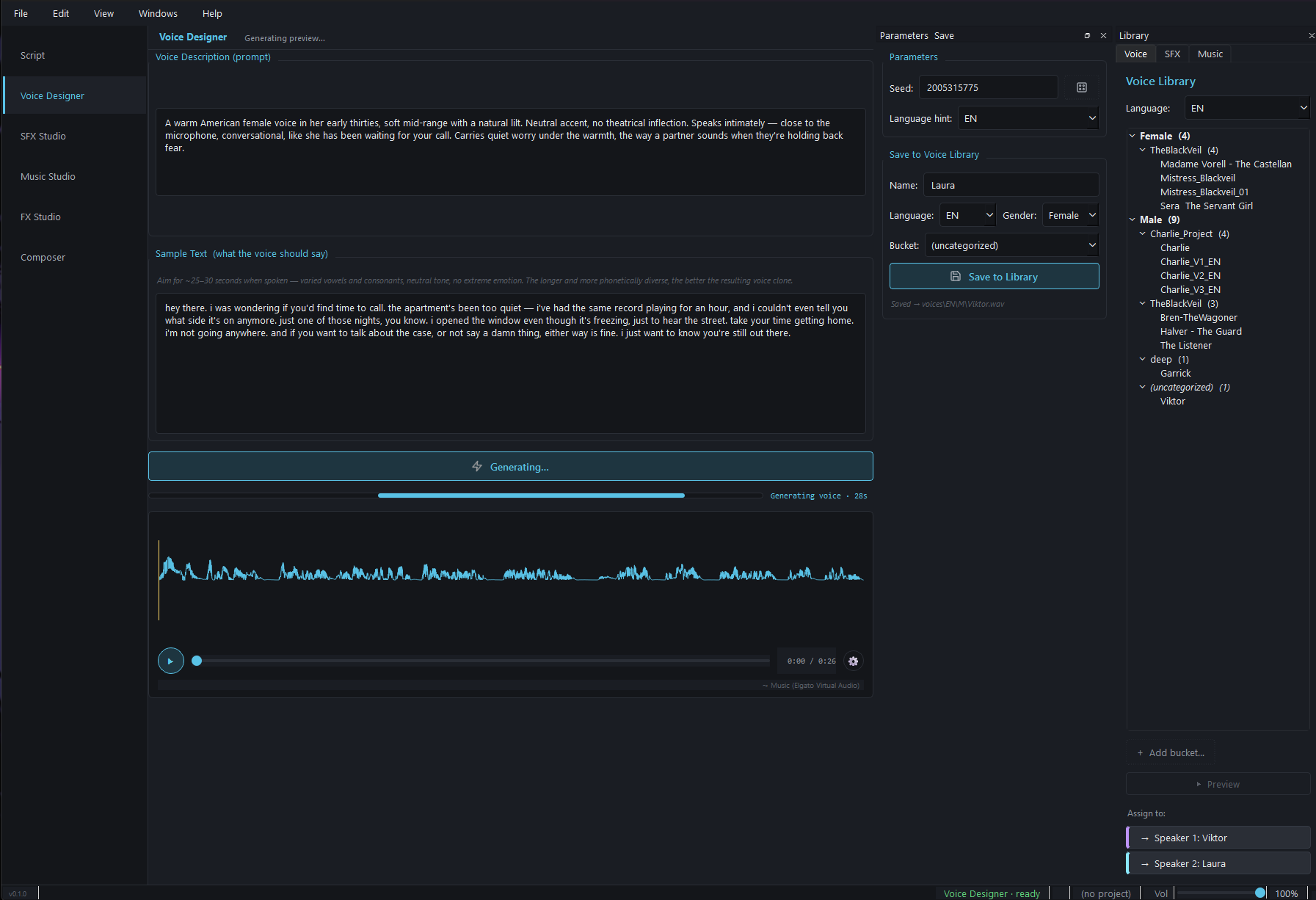
Voice Designer view — prose description, sample text, generation progress, library tree, speaker assignment
Voice Designer — generating "Laura" from a prose description

Voice Designer — generating "Laura" from a prose description, ready to assign to Speaker 2 in the Script tab.

Prose to Voice

Qwen3-TTS generate_voice_design converts a written voice description into a unique speaker identity — no reference recording required.

Sample Text Test

~25–30 second sample text confirms the voice on diverse vowels and consonants before saving — phonetic spread is what makes a clone hold up under variation.

Voice Library Buckets

Speakers saved by language (EN/DE), gender (Male/Female) and project bucket. The same Voice Library shows up in the Script tab, FX Studio and Composer.

Capture Experiment Parameters

Seed, language hint, model, and settings are stored together. This supports controlled comparisons within the same environment; model or hardware changes can still alter the result.
04 / STEP 02 · SCRIPT

Script — Multi-Speaker Conversation

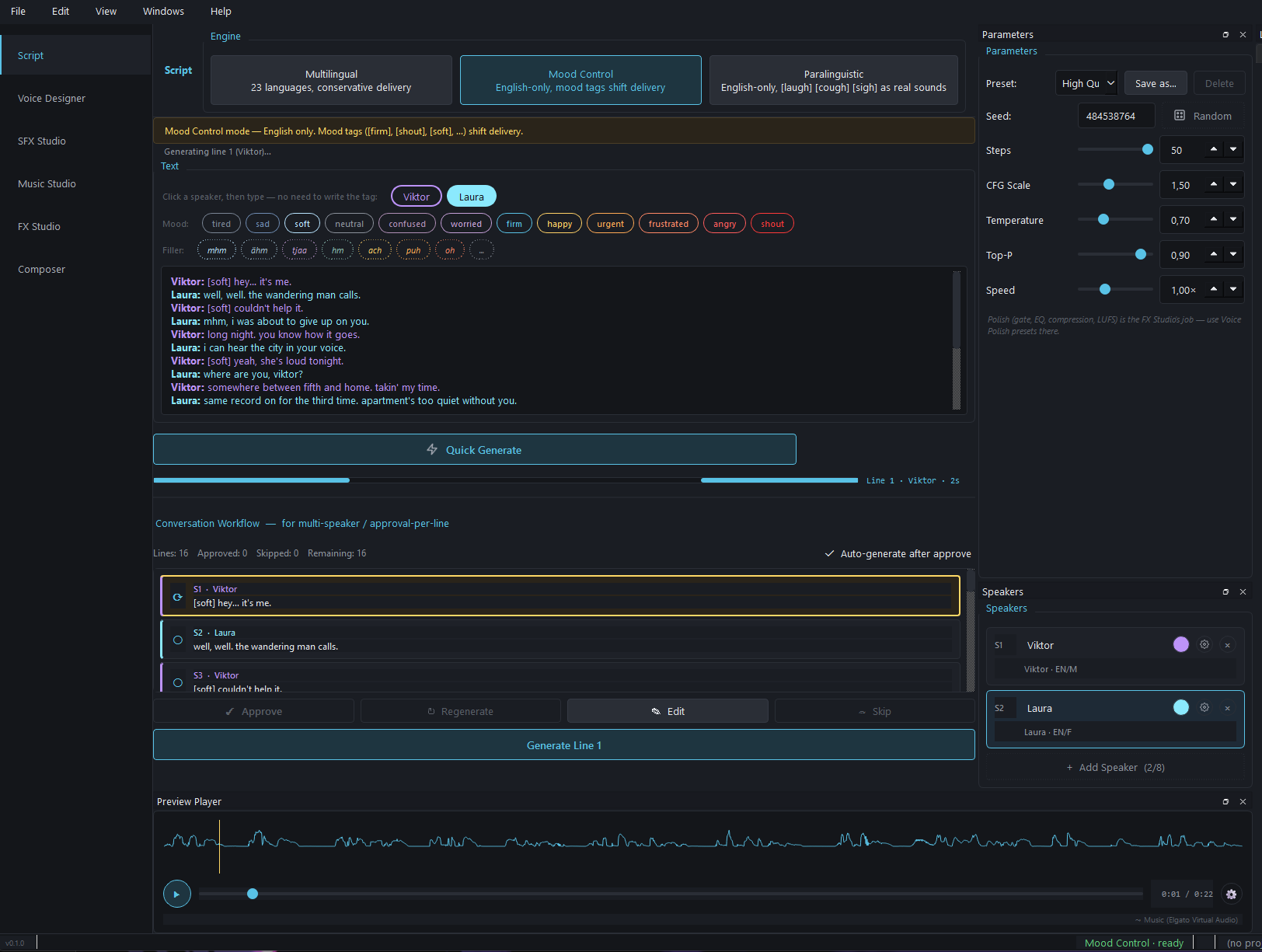
The prototype breaks multi-speaker scripts into individual, reviewable takes while keeping speakers, variants, and approvals together.

Direction controls such as [soft], [firm], [urgent], or [whisper] were tested per line. Their effect depends on the selected voice engine. The robust part of the experiment was the approval workflow: accept or regenerate individual takes without touching the rest of the session.

Script tab — engine selector, mood pill bar, multi-line script, per-line approval queue, speakers panel
Script tab — NOIR CALL loaded, mood pills above the text, per-line approval queue below

Script tab — NOIR CALL loaded with both speakers assigned, mood pills above the text, per-line approval queue below.

Replaceable Voice Engines

Several local TTS backends were tested behind one engine layer. Lazy loading and unloading reduce GPU-memory pressure, but increase dependency and distribution complexity.

Direction Cues

Inline tags keep performance intent visible in the script. They are an experimental control, not a guarantee: support and effect vary by model.

Auto-Generate + Approve

Walks through the script line by line. Approve, regenerate with a new seed, or re-mood any single line without touching the rest of the session.

Paralinguistics

Where supported by an engine, cues such as [whispers], [sigh], or [chuckle] can be tested. The final performance remains a human selection decision.

05 / THE QUALITY EXPERIMENT

Voice-Quality-Scoring (VCS)

VCS was an experimental triage layer: measurements were intended to prioritize suspicious takes, not replace human judgment.

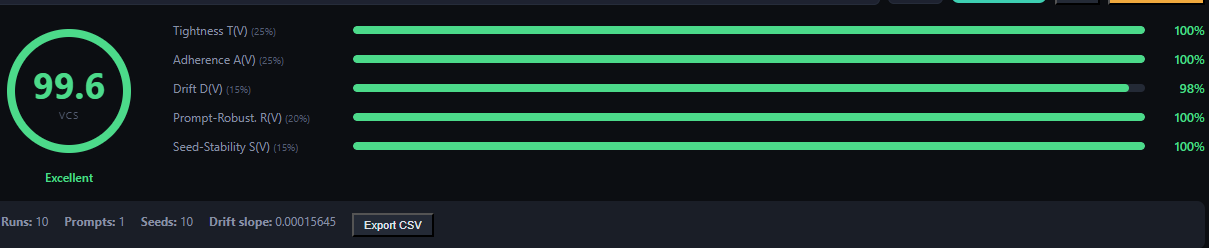
Neural TTS can miss: a clipped word, a dropped syllable, a sudden pitch swing, or a voice drifting from its reference timbre. AudioGen's Voice-Quality-Scoring combined several technical measurements into a 0–100 score and flagged unusual takes. The score was a search signal for human review, not objective proof of performance or audio quality.

Every line in the per-line approval queue carries its VCS number. Re-generations are compared against the previous best, and the spectrogram + outlier views make the failure mode visible instead of guessed.

Metric What it measures Weight Target
Speaker SimilarityCosine similarity to the target voice in speaker-embedding space (Resemblyzer)30%≥ 0.80
Transcription (WER)Whisper re-transcribes the take; word-error-rate against the intended line25%≤ 5%
Prosody / PitchF0-contour stability — penalizes toneless drops and unnatural jumps15%natural range
Clipping / LevelTrue-peak and RMS check for overload and under-level takes10%≤ -1 dBTP
Silence / TrailingDetects clipped tails, long gaps and dead air10%< 400 ms
Artifact / NoiseSNR and spectral-anomaly detection for glitches and background hiss10%high SNR
VCS CompositeExperimental weighted sum — one 0–100 signal per take100%< 85 review
VCS score panel — per-line composite score with metric breakdown
VCS score panel — composite + metric breakdown
Outlier analysis — takes flagged below threshold, ranked for re-listen
Outlier analysis — flagged takes ranked for re-listen
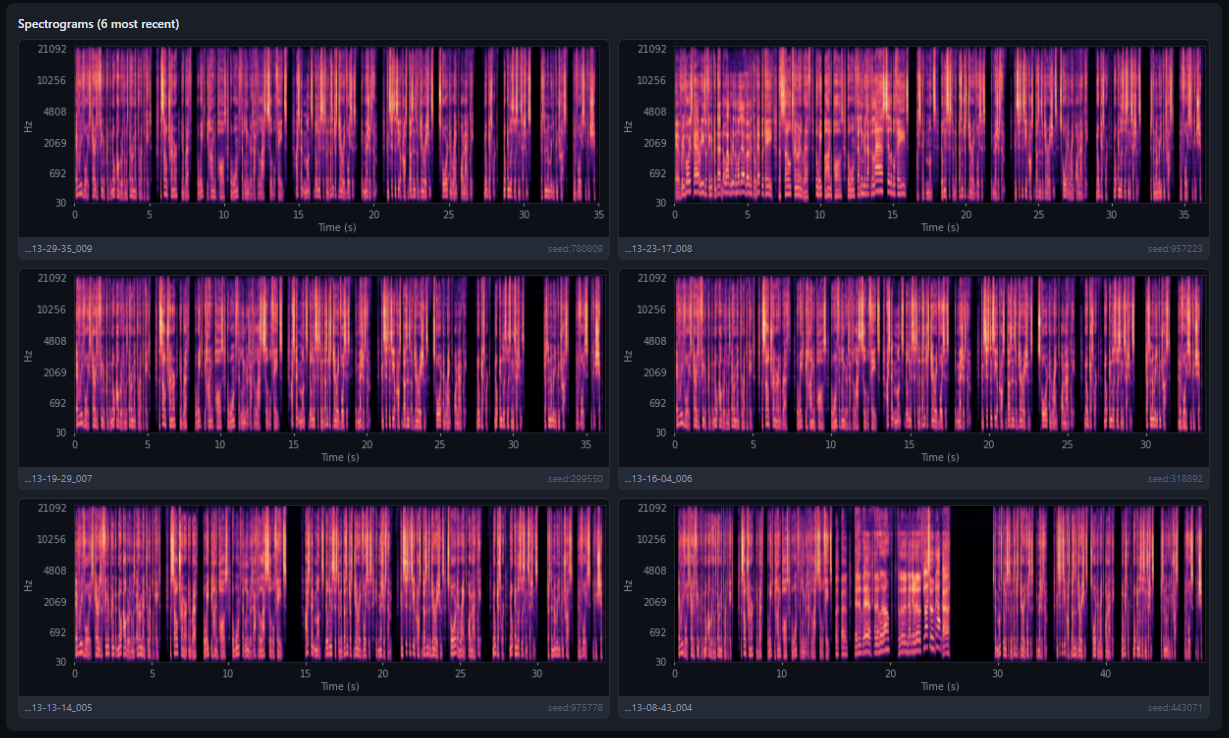
Spectrogram comparison — generated take vs. reference baseline
Spectrograms — generated take vs. reference baseline
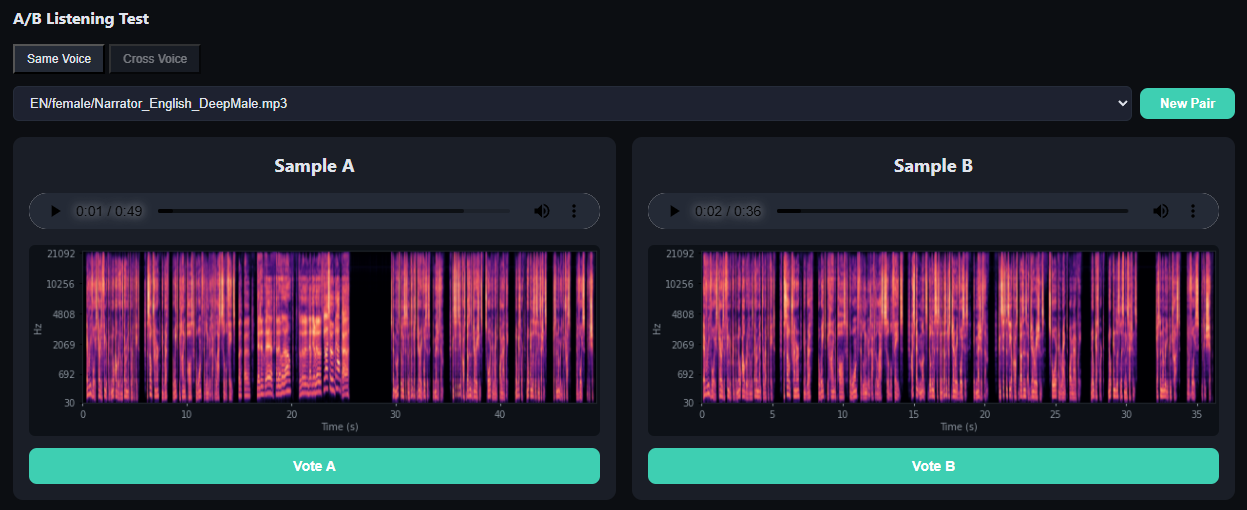
A/B test — two candidate takes scored head-to-head before the better one is kept
A/B test — candidate takes scored head-to-head

VCS makes failure modes visible — score, outlier ranking and spectrogram comparison instead of guessing.

Composite Score

Six weighted metrics produce a 0–100 signal per line. Values below the experimental threshold are highlighted; no take is approved by the score alone.

Speaker Drift Signal

Speaker embeddings can surface potential drift from the reference timbre. Whether a take works dramatically still requires a human ear.

Whisper Round-Trip

Each take is re-transcribed and diffed against its intended line. Dropped, swapped or hallucinated words surface as a WER spike, not as a surprise in the final mix.

Outlier Triage

The ranking prioritizes suspicious candidates and shortens the first search pass. Complete creative and technical approval remains human work.

06 / STEP 03 · SFX STUDIO

SFX Studio

MMAudio for short concrete sound effects, AudioLDM2 in the same pipeline for longer atmosphere loops.

Phone pickup, taxi pass on wet asphalt, footsteps: short, concrete one-shots were tested with MMAudio. Rain on rooftops, distant traffic, and room tone were created as longer loops with AudioLDM2. In testing, prompts focused on one clear element were more reliable than overloaded descriptions. Generated clips save into the SFX Library with category tags such as Ambience, Foley, Impact, or UI and can be placed directly on Composer tracks.

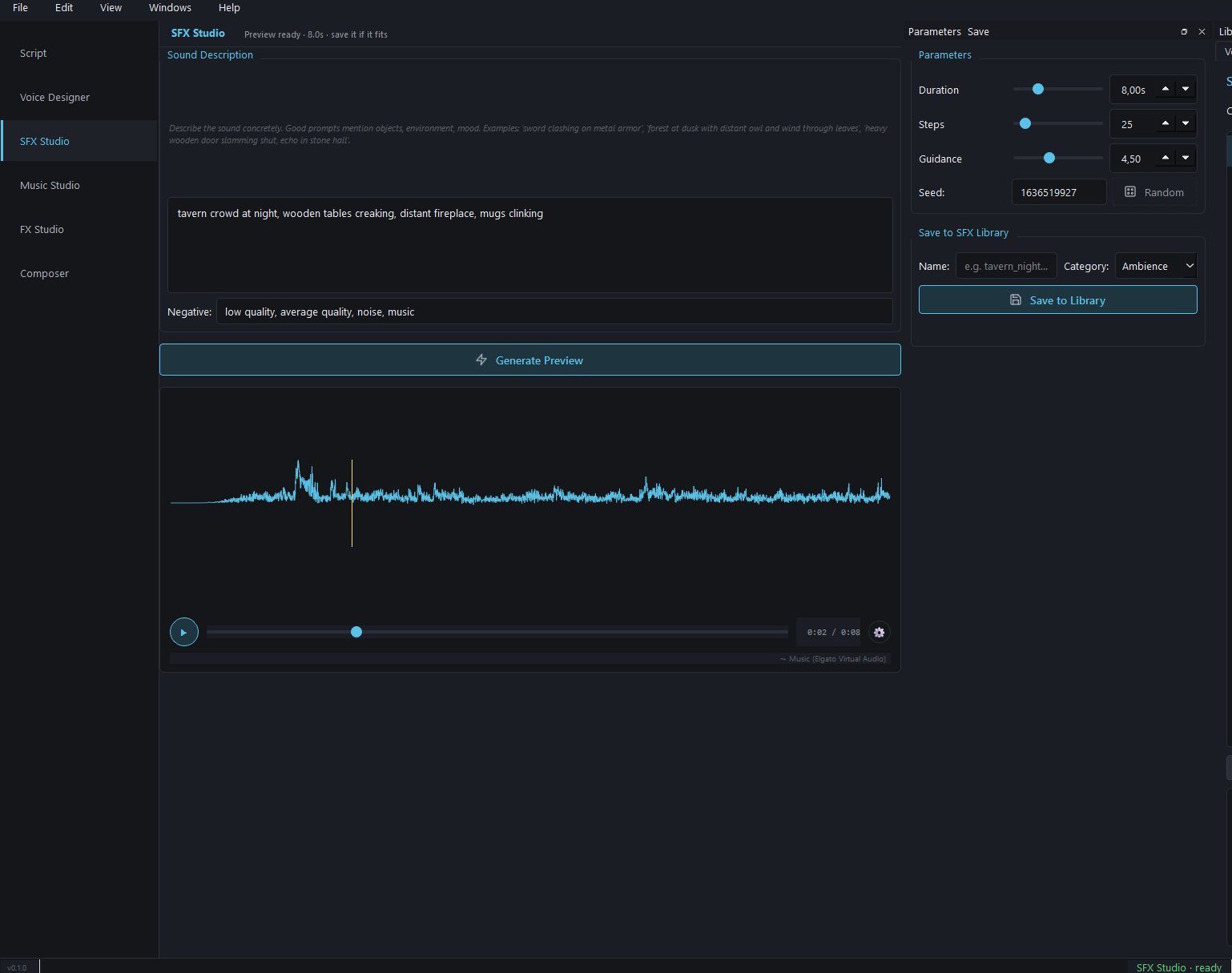
SFX Studio — prompt input, negative prompt, duration/steps/guidance/seed parameters, waveform preview, save to library
SFX Studio — generating a tavern atmosphere clip with MMAudio

SFX Studio — generating a tavern atmosphere clip with MMAudio, ready to save as a categorized library entry.

MMAudio

Used in the prototype for short, concrete one-shots such as phone_pickup, taxi_pass_wet, or vinyl_crackle. The starting configuration was 4–8 seconds, 25 steps, and guidance 4.5.

AudioLDM2

Sister engine in the same view for longer atmosphere loops — rain on rooftops, distant traffic, room tone. Hybrid-stack with MMAudio for layered scenes.

Prompt Discipline

Single-element prompts outperform stacked ones. "Wet asphalt, tire swoosh" yields clean output; "rain AND traffic AND horn AND footsteps" produces mud.

Library + Categories

SFX saved with category tags (Ambience, Foley, Impact, UI) and per-project buckets. Same library is drag-droppable from the Composer's SFX panel.

07 / STEP 04 · MUSIC STUDIO

Music Studio

ACE-Step was tested as a local Diffusers pipeline so generated music could enter the same session and Composer workflow directly.

Six modes: Generate a fresh track, Extend an existing one, Add Intro / Add Outro, Repaint a drag-selected region without touching the rest, or Cover an existing track in a different genre. Style presets ("Lo-Fi Cafe", "Cinematic Build", etc.) prefill prompt + parameters with proven defaults that you edit on top. The lyrics field is optional — leave blank for instrumental, add [verse] / [chorus] / [bridge] tags for sung output.

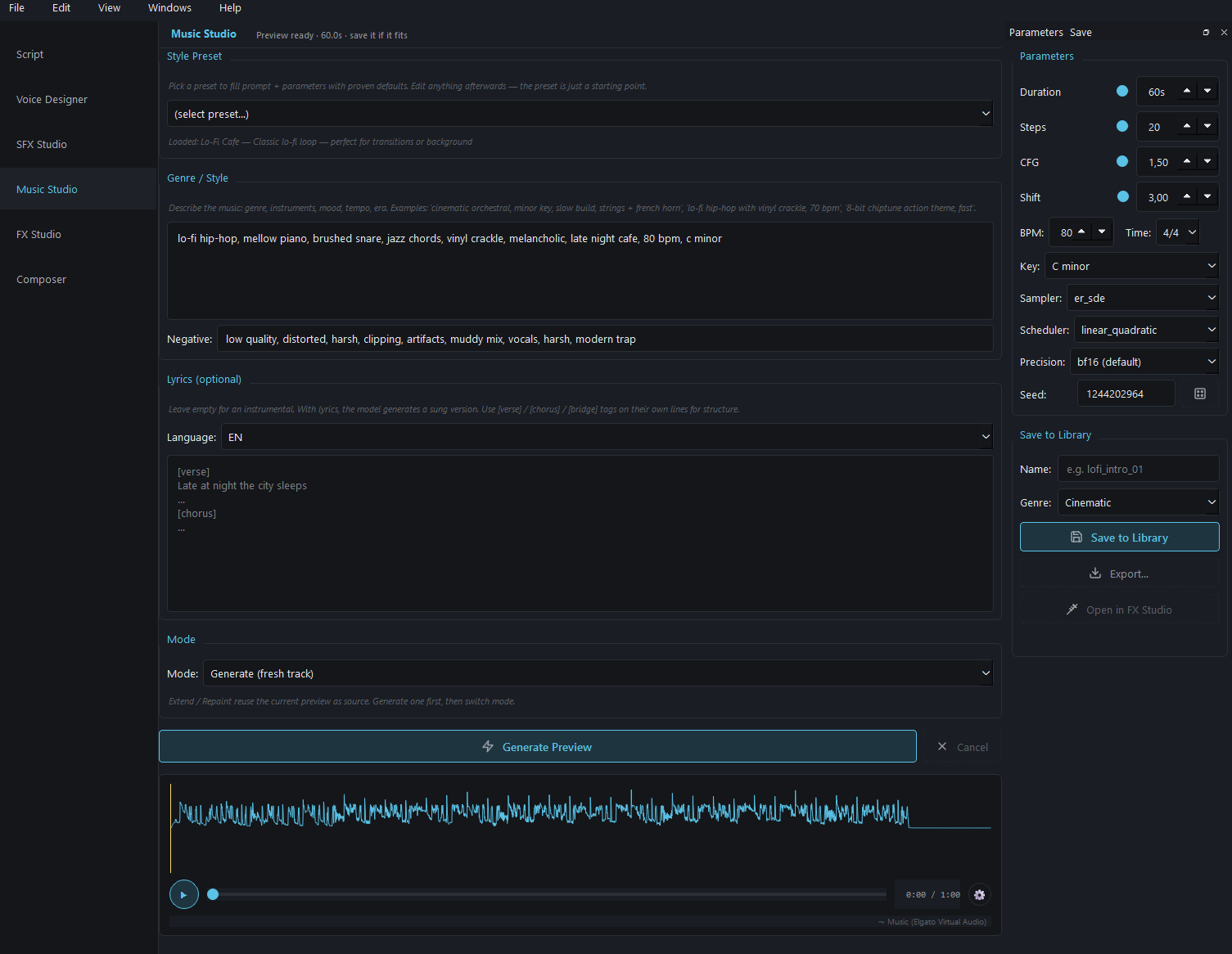
Music Studio — style preset, genre prompt, negative prompt, lyrics, mode selector, parameters panel, waveform preview
Music Studio — generating a lo-fi hip-hop loop, BPM 80, C minor

Music Studio — generating a lo-fi hip-hop loop with vinyl crackle, BPM 80, C minor. Preset "Lo-Fi Cafe" prefilled the defaults; the rest is overridden on top.

ACE-Step Experiment

ACE-Step was integrated as a local Diffusers pipeline without requiring ComfyUI. bf16 and partial offload were used to make music generation practical on the available 16 GB test GPU.

Six Modes

Generate · Extend · Add Intro · Add Outro · Repaint a drag-selected region · Cover an existing track in a new genre.

Style Presets

Curated prompt + parameter pairs you start from and edit on top — "Lo-Fi Cafe", "Cinematic Build", "8-bit Action Theme" and more. Faster than building prompts from scratch.

Open in FX Studio

One-click handoff from a saved Music Studio track straight into FX Studio's Music tab for mastering — no file management in between.

08 / STEP 05 · FX STUDIO (VOICE)

FX Studio — Voice

Per-speaker and per-line effect chains for the whole conversation.

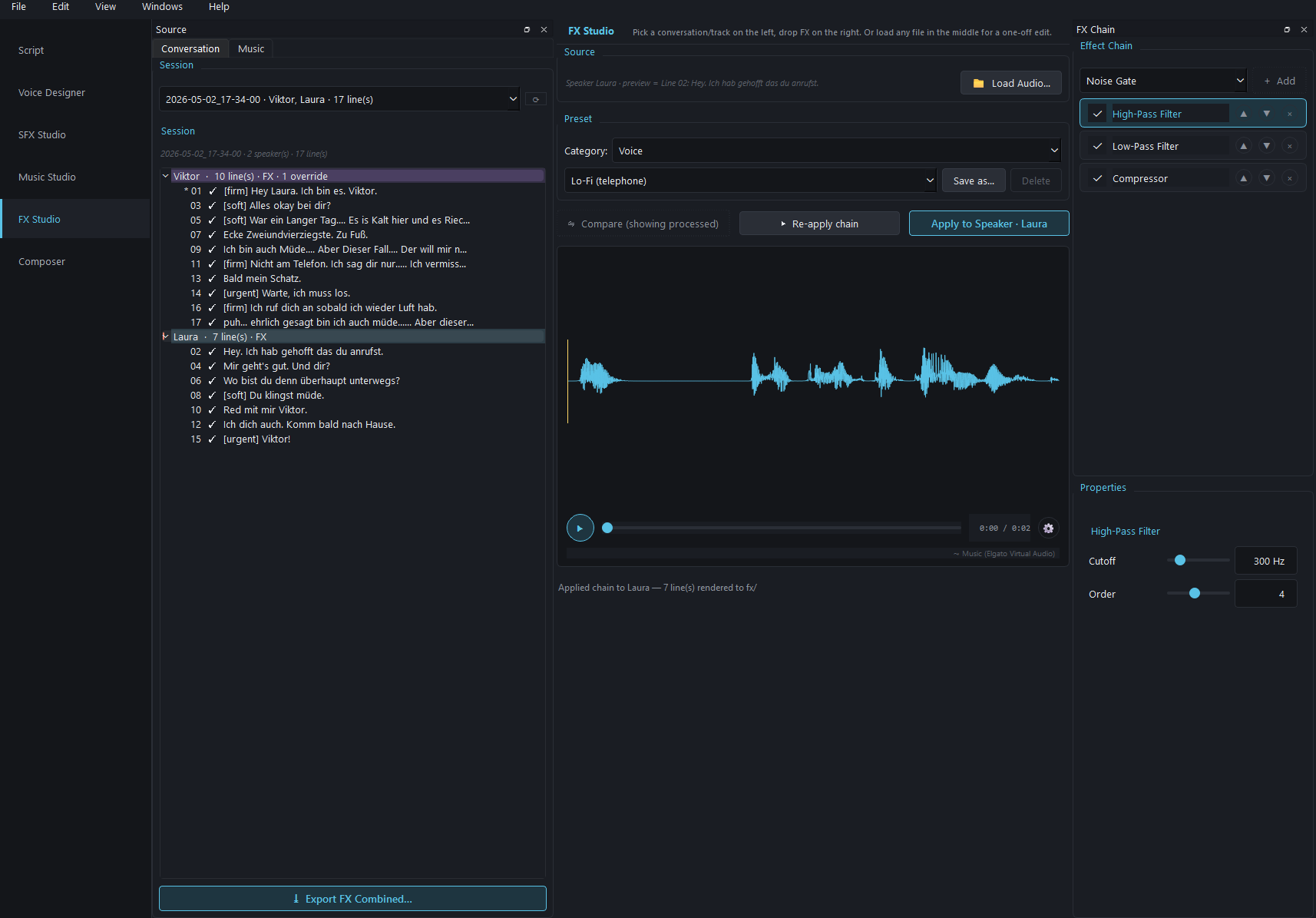
Pick a session from the dropdown, see every line organized by speaker on the left, build an effect chain on the right. Apply a chain to an entire speaker (Laura gets the Telephone-Filter — High-Pass 300 Hz, Low-Pass 3400 Hz, slight saturation, compressor, gain trim — for the whole call) or override one specific line for emphasis. The Compare button A/Bs original vs. processed; Export FX Combined writes the rendered version back as a session-bound artifact.

FX Studio voice — session selector, per-speaker line tree, effect chain panel with High-Pass / Low-Pass / Compressor, properties for cutoff and order
FX Studio — Laura selected, Lo-Fi telephone preset loaded

FX Studio — Laura selected, Lo-Fi (telephone) preset loaded, chain ready to apply across all 7 of her lines.

Per-Speaker FX

Apply an effect chain to every line of one speaker at once. Telephone-filter on the partner in a phone-call scene, broadcast polish on the narrator, no per-line manual work.

Per-Line Override

Single line needs an emphasis push? presence_boost at 2 kHz on just that line. The tree shows * markers where overrides live, so you see at a glance what's customized.

Voice Presets

Curated chains: Voice Polish (Subtle), Voice Polish (Broadcast), Lo-Fi (telephone), Whisper Close-Mic, Radio. Save your own with one click.

Compare A/B

Click Compare to flip between original and processed in place — same waveform window, no separate player to manage.

09 / STEP 06 · FX STUDIO (MUSIC & STEMS)

FX Studio — Music & Stems

Same FX Studio shell, Music tab. Mastering chains, Demucs stem separation and remix-back — non-destructive.

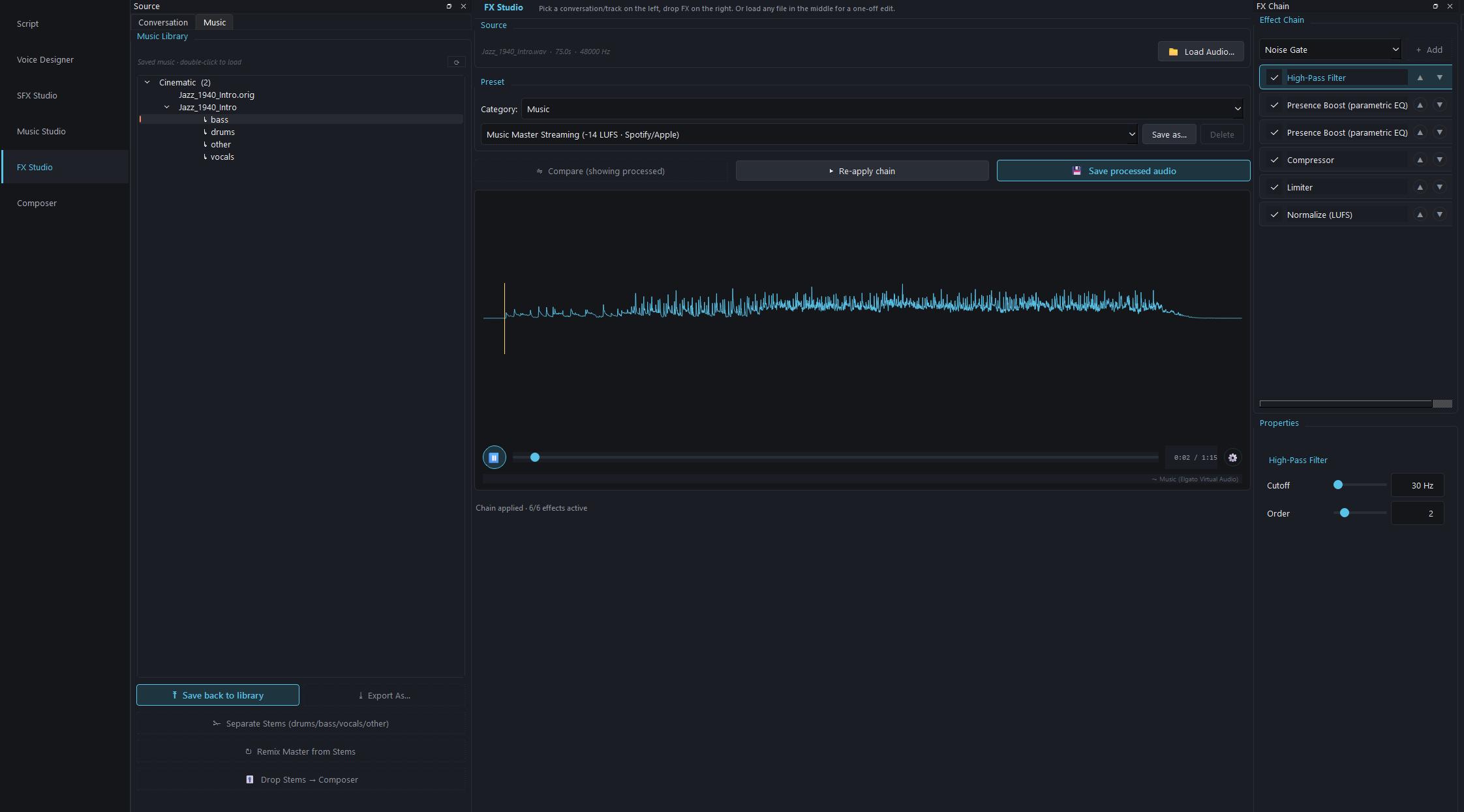
Mastering chains use a separate preset category. “Music Master Streaming (-14 LUFS · Spotify/Apple)” was the tested starting point, combining high-pass filtering, presence processing, compression, limiting, and LUFS normalization. Below the music library, Separate Stems uses Demucs to split tracks into drums, bass, vocals, and other. The stems become children of the master track and can enter the Composer as four parallel lanes with independent volume, FX, and mute control, or be remixed into a new master.

FX Studio music tab — music library with stems hierarchy, master streaming preset chain, separate stems / remix master / drop to composer buttons
FX Studio Music tab — Jazz_1940_Intro split into 4 Demucs stems

FX Studio Music tab — Jazz_1940_Intro split into 4 Demucs stems (bass / drums / other / vocals), Music Master Streaming chain (6 effects) applied.

Demucs Stem Separation

The prototype separates music tracks into drums, bass, vocals, and other. Stems appear as children of the master in the library and can be processed independently.

Music Mastering Presets

Eight presets including streaming (-14 LUFS Spotify/Apple), cinematic (-16 LUFS), broadcast and lo-fi character chains. Pick one, tweak the chain, save your own.

Drop Stems → Composer

One button drops all four stems onto the Composer timeline as parallel tracks — mute the drums, duck just the vocals under voice lines, layer effects per stem.

Remix Master from Stems

After per-stem edits, remix back into a single mastered file. The original stays in the library; the remix becomes a new entry — non-destructive workflow.

10 / STEP 07 · COMPOSER

Composer — Multi-Track Timeline

Where everything comes together. Voice sessions, SFX, music and stems on one timeline — with auto-sync, snap and crossfade.

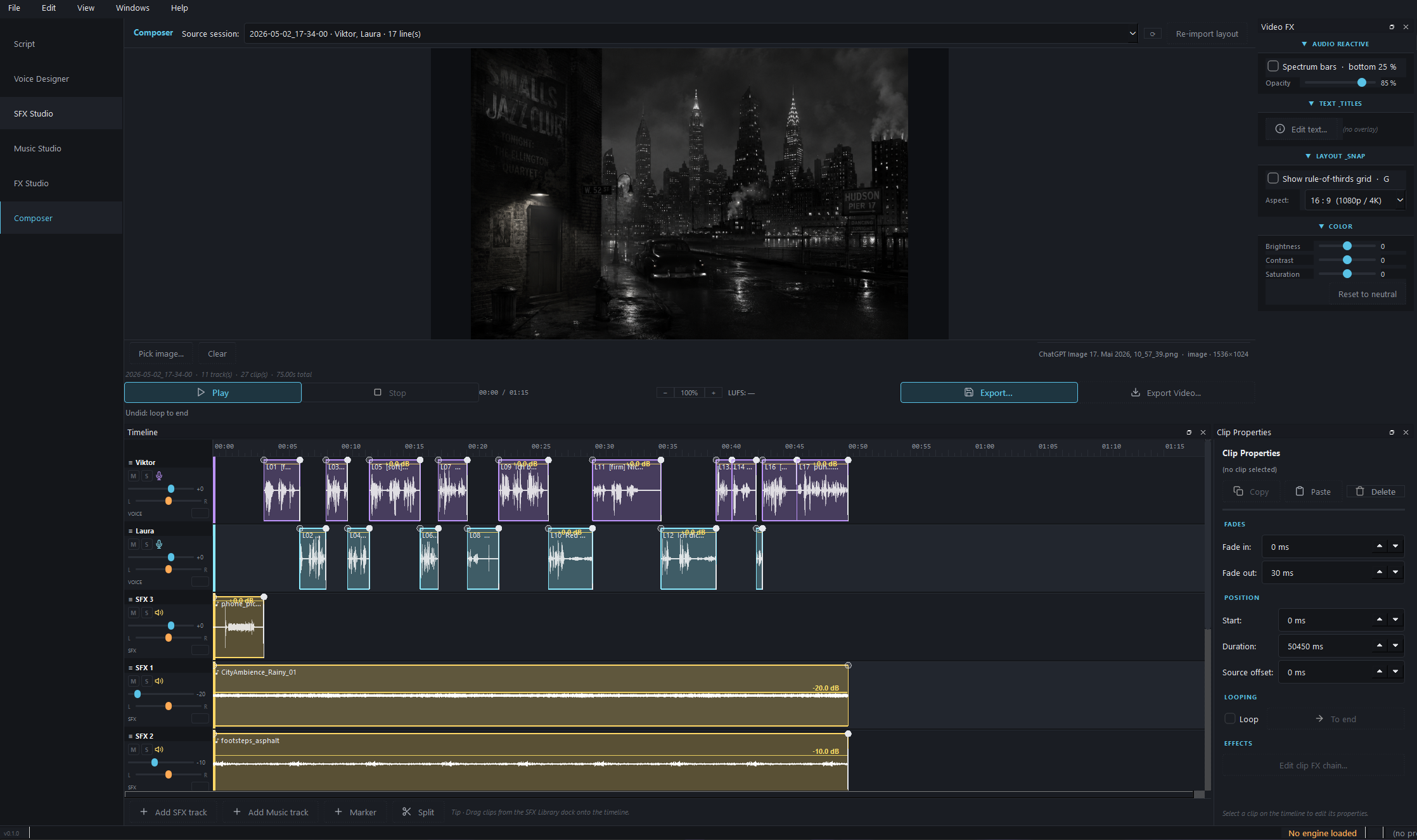
Voice sessions auto-sync from the Script tab as two parallel speaker tracks with proper gaps between lines. SFX clips drag from the library onto their own lanes. Music sits on a dedicated lane (or four lanes if you dropped stems). Per-track color, type icon, drag-handle rename, individual volume. Auto-snap to clip edges, BPM beats and markers. Auto-crossfade on overlapping music / SFX / ambience clips. Multi-select with Alt+Drag, ripple-edit with Alt+Shift+Drag. Two export targets: a single WAV / MP3 of the audio mix, or an MP4 with the audio plus audio-reactive visuals (spectrum bars, waveform pulse) overlaid on a still cover image.

Composer view — NY skyline cover, multi-track timeline with voice / SFX / music lanes, video FX panel for audio-reactive overlays
Composer — NOIR CALL laid out across voice, SFX and music lanes

Composer — NOIR CALL session laid out across voice lanes (Viktor / Laura), SFX track (footsteps, taxi), music lane with the vinyl loop. Video FX panel on the right configures audio-reactive overlays for MP4 export.

Auto-Sync from Script

Picks up the latest Script session, builds two voice tracks with proper gaps, drops every line as a clip in order. Zero manual timeline assembly for dialogue.

Smart Snap

Clip edges, markers and BPM beats all snap automatically. Disable per-operation by holding Shift while dragging.

Auto-Crossfade

Overlapping music / SFX / ambience clips crossfade automatically — manual fade-curves only when you want to override them.

Ripple Edit & Multi-Select

Alt+Drag for multi-select, Alt+Shift+Drag for ripple. Move one clip and downstream clips slide with it — like DaVinci, but for audio drama.

Track Customization

Per-track color (12 presets + custom), type icon (mic / music / speaker / wave), inline rename via drag handle, individual volume + mute / solo.

Markers

Drop named markers on the timeline for chapter points, cue points and edit anchors. Snap targets and visual reference during playback.

Audio Export

WAV (24-bit, source sample rate) or MP3 (variable bitrate). Master-bus FX applied, peak limiter at -1 dB, LUFS-normalized to the selected target.

Video Export

MP4 with the audio mix plus audio-reactive overlays — spectrum bars, waveform pulse, configurable resolution / FPS / brightness / glow — layered over a still cover image.

A/B Final Listen

The exported master can be re-scored by VCS one last time, so the final mix ships with a measured number rather than a hopeful one.

11 / UNDER THE HOOD

Research-Stage Architecture

AudioGen evolved with the models under test. The June 2026 snapshot shows both substantial integration work and the cost of maintaining a broad local model stack.

Desktop Shell

PySide6 and Qt 6 provide the desktop interface. Python remained practical for direct access to the PyTorch ecosystem, while several large views eventually became difficult-to-maintain monoliths.

Isolated Engine Workers

Incompatible model stacks for OmniVoice, Higgs Audio, and Stable Audio were isolated in separate environments and processes. This protects the main app from conflicts, but increases installation and support cost.

Voice Research

OmniVoice, Higgs Audio, and Qwen-based voice-design paths were tested behind shared workflows. Take management, approval, and replaceability mattered more than any single model.

Experimental Voice QA

Whisper round-trip transcription, speaker embeddings, and F0, level, and spectral analysis feed the VCS signal. The approach prioritizes review cases but does not replace human approval.

Music and SFX

ACE-Step, Stable Audio, and MMAudio were integrated as local generators. The research also showed how quickly model changes create drift in documentation, dependencies, and license review.

DSP and Stems

NumPy, SciPy, and librosa support analysis and effect chains; Demucs separates music into stems. Open edge cases around stereo linking, NaN/Inf values, and GPU lifecycle show why tests would be essential for a product.

Local Data

Project-scoped libraries keep voices, takes, SFX, music, and FX artifacts together. Scripts and generated media remain on the user's machine in the tested local workflow.

Distribution as a Boundary

The complete development setup spans several environments and many gigabytes of model weights. Installer, updates, hardware checks, and third-party licensing emerged as product problems of their own.

Research, Not a Release

The prototype answered the workflow question and produced a real production result. Without tests, a validated installer, and a narrower product focus, it is deliberately not presented as a finished commercial product.

PySide6 OmniVoice Higgs Audio Qwen Voice Design ACE-Step Stable Audio MMAudio Demucs Resemble Enhance Resemblyzer Whisper PyTorch / CUDA Diffusers NumPy / SciPy librosa FFmpeg
12 / OUTCOME

What the Prototype Proved

What Worked

A coherent local workflow can materially simplify iteration on dialogue-heavy scenes. The most valuable part was not the number of generators, but the connection between script, takes, approval, basic quality screening, and timeline. NOIR CALL is the concrete evidence.

What Did Not Scale

An all-in-one model zoo quickly creates more maintenance, distribution, and licensing work than product value. The conclusion is therefore not a sales promise: if the research continues, it should become a much smaller narrative-audio workflow with replaceable engines and human approval at its center.

← Back to Home